

.svg)

.svg)
Smart Tags
Turn every customer and prospect conversation into structured, actionable data.
What Are Smart Tags?
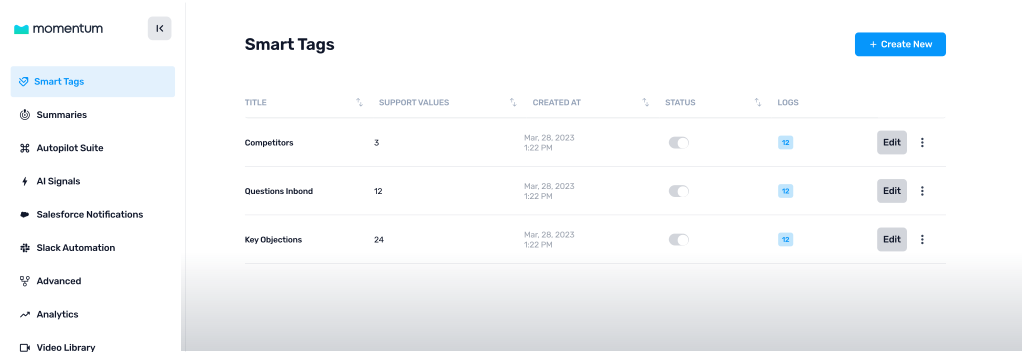
Smart Tags use AI to automatically extract meaningful signals from your recorded customer and prospect conversations and persist them as structured, reusable data. Think of them as intelligent labels that read every conversation so your team doesn’t have to.
Each Smart Tag is configured with a natural-language prompt and a response type — boolean, text, picklist, or multi-picklist — giving you full control over how conversation intelligence is categorized and surfaced across Momentum.
How it works
1. Define your Tag
Give it a name and write a natural-language prompt describing what signal to detect (e.g., “Identify which competitors were mentioned during the conversation”).
.svg)
.svg)
2. Choose a response type
Pick the format that fits: Boolean (yes/no), Text (free-form), Picklist (single select), or Multi-Picklist (multiple selections).
3. Let Momentum do the rest
Every new conversation is automatically analyzed. Tags are populated and persisted on the call record — ready for filtering, automation, and analysis.
.svg)
Flexible Response Types
Smart Tags adapt to the signal you’re tracking. Choose the response type that matches your use case:
Boolean
Was troubleshooting discussed?
true / false
Text
Summarize the main objection raised
"Budget timing..."
Picklist
What type of conversation was this?
Discovery
Multi-Picklist
Which competitors were mentioned?
Gong, Chorus
What You Can Do With Smart Tags
Smart Tags aren’t just labels — they’re the foundation for smarter workflows, sharper filtering, and deeper analysis across your entire customer-facing organization.
Filter Your Call Library by Smart Tags
Filter Your Call Library by Smart TagsFinding the exact conversations you need just got dramatically faster. Smart Tag filtering is now live in the User Call Library, powered by a high-performance Elasticsearch backend that makes filtering instant and scalable — no matter how large your call library grows.Whether you’re searching for competitive moments, customer objections, product feedback, or any other key theme, Smart Tag filters let you surface precisely what you need in seconds.
Call Library Filtering — Use Cases

Zero in on competitive conversations.
Filter calls tagged with “Competitor Mention: Gong” to review positioning battles and understand win/loss drivers across customer and prospect interactions.
Surface key themes instantly. Filter by tags such as “Pricing Objection,” “Security Review,” or “Feature Request” to find the exact moments that matter — across every customer-facing conversation.
Identify patterns across teams, segments, and time windows.Compare how often “Implementation Risk” appears across enterprise vs. mid-market conversations, or track how objection themes shift quarter over quarter.
Build curated call sets for enablement and coaching. Create focused playlists based on real tagged moments — like “Discovery Quality” or “Decision Criteria” — so managers can coach from actual conversations, not hypotheticals.
Trigger Autopilot Workflows
Turn conversation signals into automated action. When a Smart Tag fires, use it as a condition in Autopilot to kick off the right workflow automatically:
Competitor mentioned? Notify enablement and attach the relevant battlecard.
Conversation classified as Discovery? Trigger MEDDPICC field extraction. Technical demo? Run a different extraction set.
Pricing objection detected? Alert the deal team and flag the opportunity for review.
Customer escalation identified? Route to the CS team and create a follow-up task automatically.
Analyze Trends at Scale
Aggregate Smart Tag data across hundreds or thousands of conversations to uncover patterns: Which competitors are showing up most often this quarter? What percentage of discovery calls convert to technical demos? Where are feature requests concentrated? Are pricing objections spiking in a particular segment? Smart Tags turn anecdotal feedback into quantifiable intelligence across every customer and prospect touchpoint.
Power Coaching Workflows
Route conversations to the right coaching competencies based on what actually happened. A discovery call gets evaluated against discovery-specific criteria; a technical demo triggers a different set of coaching benchmarks; a customer success check-in uses its own framework. Smart Tags make coaching contextual, not generic — whether the conversation is with a new prospect or a long-standing customer.
Before vs. After Smart Tags
Manual. Teams forget, skip, or mis-tag.
Automatic. Every conversation, every time.
Search by keywords and hope for the best.
Filter by structured signals with a single click.
One-size-fits-all workflows.
Context-aware triggers based on what was actually said.
Anecdotal. “I think competitors come up a lot.”
Quantified. “Gong was mentioned in 34% of conversations this quarter.”
Generic competency reviews.
Conversation-type-specific coaching benchmarks.
Getting Started
Smart Tags are available now. Here’s how to start putting them to work:
.svg)
In your Admin settings.


Start with a high-value signal like competitor detection or conversation type classification.


In plain language describing the signal to detect, and select the appropriate response type.


Use the Call Library filters and Autopilot conditions to put your Smart Tag data to work.
Coming Soon
Autopilot Classic conditions
— Use Smart Tags as triggers within Autopilot Classic workflows (in progress).
Coaching integration
— Route conversations to context-specific coaching competencies based on Smart Tag output.
The Bottom Line
Every customer and prospect conversation contains intelligence your organization needs. Smart Tags make sure none of it gets lost.
Stop asking teams to manually tag conversations. Stop guessing which competitors are showing up across your pipeline. Stop running one-size-fits-all automations when the context of every conversation is different.
Smart Tags turn conversation signals into structured data — automatically, accurately, and at scale.

Questions?
Reach out to your Momentum team — we’re happy to help you configure your first Smart Tags.



.avif)
.avif)

Into Your Competitive Edge